Bitdefender Antivirus Free Edition, basit kurulum süreci ve düşük sistem kaynakları tüketimiyle geniş bir kullanıcı kitlesine güvenilir koruma sunar.
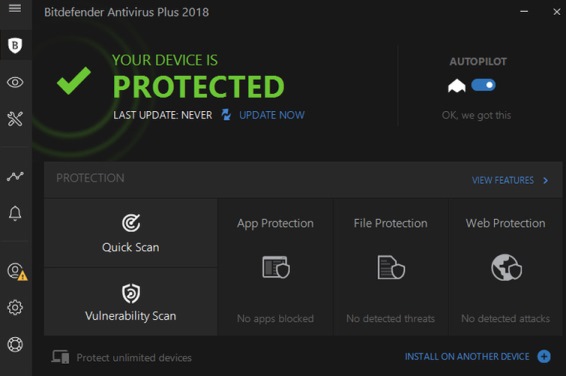
Bitdefender Antivirus Free Editon İndir
Geliştirici: Bitdefender • 849 Görüntülenme
İndirme Seçenekleri ve İşletim Sistemleri
Bitdefender Antivirus Free Editon İndir Resmi Dağıtım Sayfası
Bu yazılım için portalımızda doğrulanmış hazır kurulum dosyası bulunmuyor. Geliştiricinin resmi sürüm ve kaynak kod sayfasına yönlendiriliyorsunuz.
⚖️ Editör Değerlendirmesi: Artı ve Eksi Yönler
✓ Öne Çıkan Artıları
- • Kolay kurulum ve kullanıcı dostu arayüz
- • Gerçek zamanlı koruma ve otomatik güncellemeler
- • Düşük CPU ve RAM tüketimi
- • Geniş işletim sistemi desteği
✕ Eksileri / Geliştirilebilir
- • Türkçe dil desteğinin eksikliği
- • Ücretsiz sürümde gelişmiş güvenlik özellikleri sınırlı
Program İncelemesi ve Kullanım Kılavuzu
Bitdefender Antıvirüs Free Edition ücretsiz olarak sunulan hızlı, hafif (En azından güçlü pclerde) kullanışlı ve veritabanı olarak oldukça güçlü bir yazılımdır.Romanyanın geliştirmiş olduğu kendine has motoru ve veri tabanı olan bu yazılım ortalamanın üstünde işler çıkartmaktadır. Anlık koruması bulunan yazılımın en büyük eksikliği Türkçe Dil desteğinin bulunmayışıdır. Geçmiş dönemlerin efsaneleri arasında yer alan bir yazılım son zamanlarda popülerliğini biraz kaybetsede hala gücünü koruduğunu rahatlıkla söyleyebiliriz. Eski pc kullanıcıları için Bitdefender + kaspersky (Ondemand) ekibi müthiş işler çıkartan efsane ikilidir. Son zamanlarda yapılan antivirus güvenilirlik testlerine baktığımızda Bitdefenderin Başa oynadığını hatta bir çok testte kaspersky ve symantec ekibini altında tuttuğunu görebiliyoruz. Tabi bu testler sadece bilgi amaçlı olup önemli olan kişinin bilgi güvenliğini önemsemesi derecesidir. Bitdefender bazı ürünlerinde kayıt zorunluluğu getirsede bu sürümde herhangi bir kayıt zorunluluğu bulunmamaktadır. Kayıt olduğunuzda size son gelişmeler ile ilgili bilgilendirme mailleri gelebilir.
Bitdefender Free Edition Özellikleri
Bitdefender Antivirus Free Edition, oldukça hızlıdır. Kolay ve basit bir kullanım yapısı sunar. Arayüzü kullanışlıdır. Kurulumu son derece basittir. Pcyi yavaşlatmadan arka planda sessizce çalışarak kötücül yazılımları engeller. Oyun oynarken veya video izlerken sizi rahatsız etmez. Güçlü bir veritabanı olduğu için zararlı tanıma oranı oldukça yüksektir. Kurulum Sonrasında ayar gerektirmeden varsayılan ayarlarla oldukça iyi bir koruma sağlar.
Bitdefender Free sistem gereksinimleri
Bitdefender Antivirus Free Edition'ın bilgisayarınızda sorunsuz olarak çalıştıracak minimum sistem konfigrasyonuna baktığımızda Windows 7 ve Üstü bir işletim sistemi olması gerektiğini görüyoruz. 800 Mb Disk alanı ve 2 Gb ram olarak sıralanmaktadır. İşletim Sistemi : Windows 10, 8.1, 8 veya 7 SP1, ve İnternet explorer 10 Ram : 1.5 GB RAM (2 Gb Ram Önerilir. ) Disk Alanı : 800 Mb İşlemci : Intel Core Duo 2 veya Eşdeğeri bir işlemciBitdefender Free Edition İndir
Bitdefender Ücretsiz antivirüs yazılımını indirmek için öncelikle sitemizde sağ üst köşede yer alan HEMEN İNDİR düğmesine tıklamanız yeterlidir. Güvenli olarak Bitdefender sunucularından 10 saniye içerisinde Bitdefender Free 2018 indir işlemi başlayacaktır.Bitdefender Free Edition Kurulumu
Bitdefender kurulumu son derece basittir. İndirme dosyasını çift tıklayarak kurulum aşamasını başlatabilirsiniz. Toplam açılmış boyutu 800 mb kadar ulaşan dosya için son derece küçük bir indirme dosyası sunulmuştur. Yaklaşık 9.5 Mb boyutundadır. Kurulum için ekstra bir ayar gerekmemektedir. Varsayılan olarak tanımlanan tüm ayarlar bir ev kullanıcısının güvenliğini en iyi düzeyde sağlayabilmektedir. ENGLISH1. WHAT IS BITDEFENDER ANTIVIRUS FREE?
Bitdefender Antivirus Free is designed to offer advanced real-time protection to Windows operating systems against the latest threats. It is delivered free of charge and requires activation with a Bitdefender account. Due to the in-the-cloud scanning technology embedded in the product, the impact on the system is reduced to zero while you can enjoy different activities on your system. The protection settings are configured and enabled by default after the installation, with no need of intervention from your side. Bitdefender Antivirus Free takes security-related decisions in the background, notifying you on important events. The following features are packed in the program: ● Active Threat Control for checking and detecting programs with suspicious activities. ● On-access scanning for real-time scanning of all accessed files. ● On-demand scanning for scanning files or folders at your request. ● Web Protection for detecting and blocking malicious web pages.What is Bitdefender Antivirus Free? Bitdefender Antivirus Free
2. INSTALLATION AND REMOVAL2.1. System requirements
You may install Bitdefender Antivirus Free only on computers running the following operating systems: ● Windows 7 with Service Pack 1 ● Windows 8 ● Windows 8.1 ● Windows 10 Before installation, make sure that your computer meets the recommended system requirements. 2.1.1. Recommended system requirements ● 2 GB available free hard disk space (at least 800 MB on the system drive) ● Intel CORE Duo (2 GHz) or equivalent processor ● 1.5 GB of memory (RAM) 2.1.2. Software requirements To be able to use Bitdefender and all its features, your computer needs to meet the following software requirements: ● Internet Explorer 10 or higher 2.2. Preparations before installation Before installing Bitdefender Antivirus Free, make sure you already have followed these recommendation: ● Check that the system requirements for Bitdefender Antivirus Free are met. When the system requirements are not met, either the Bitdefender Antivirus Free will not install all its files, or will not work correctly. ● Log on to the computer using an Administrator account. ● Remove any other security software from the computer. When you use more than one security solution on the same computer, the system becomes unstable. Installation and removal 2 Bitdefender Antivirus Free 2.3. Installing Bitdefender Antivirus Free To ensure that no active threat is running on your system, a quick scan is set to start at the beginning of the installation. The default install location of Bitdefender Antivirus Free is C:\Program Files\Bitdefender Antivirus Free. This location cannot be changed. To begin the installation: 1. Double-click the installer file to launch the setup wizard. 2. Two additional tasks can be performed at this step: ● Read the Subscription Agreement which contains the terms and conditions under which you may use Bitdefender. If you do not agree to these terms, close the window, and then click Cancel in the installation window. The installation process will stop and exit the setup. ● Keep the Send anonymous usage reports option enabled. By allowing this option, reports containing information about how you use the product are sent to the Bitdefender servers. This information is essential for improving the product and can help us provide a better experience in the future. Note that these reports contain no confidential data, such as your name, and that they will not be used for commercial purposes. 3. Click INSTALL to begin the installation. Details about the progress are displayed. It takes just a few moments to complete the setup. 4. A Bitdefender account is required in order to activate the product. Click SIGN IN TO Bitdefender to continue. If you click NOT NOW, the product will not be activated. This means that your system will stay unprotected until you sign in using an account or create a new one. 5. Proceed according to your situation. I want to create a Bitdefender account To successfully create a Bitdefender account, type the required information in the corresponding fields, and then click CREATE ACCOUNT. The data you provide here will remain confidential. The password must be at least 8 characters long and include a digit. Installation and removal 3 Bitdefender Antivirus Free Note Once the account is created, you can use the provided e-mail address and password to log in to your account at https://central.bitdefender.com. I already have a Bitdefender account Click the Sign In link, then type the e-mail address and the password of your Bitdefender account; next, click the SIGN IN button. If you forgot the password for your account or you simply want to reset the one you already set, click the Forgot my password link. Type your e-mail address, then click the FORGOT PASSWORD button. I want to sign in using my Microsoft, Facebook or Google account To sign in with your Microsoft, Facebook or Google account, follow these steps: a. Select the service you want to use. You will be redirected to the login page of that service. b. Follow the instructions provided by the selected service to link your account to Bitdefender. Note Bitdefender does not get access to any confidential information such as the password of the account you use to sign in, or the personal information of your friends and contacts. 2.4. Removing Bitdefender Antivirus Free If you want to remove Bitdefender Antivirus Free from your system, follow these steps: ● In Windows 7: 1. Click Start and go to All Programs. 2. Find Bitdefender Antivirus Free and select Uninstall. 3. Click Remove in the window that appears. 4. You need to restart the computer to complete the process. ● In Windows 8 and Windows 8.1: Installation and removal 4 Bitdefender Antivirus Free From the Windows Start screen, locate Control Panel (for example, you can start typing "Control Panel" directly in the Start screen) and then click its icon. 1. 2. Click Uninstall a program or Programs and Features. 3. Find Bitdefender Antivirus Free and select Uninstall. 4. You need to restart the computer to complete the process. ● In Windows 10: 1. Click Start, then click Settings. 2. Click the System icon in the Settings area, then select Installed apps. 3. Find Bitdefender Antivirus Free and select Uninstall. 4. You need to restart the computer to complete the process.Kurulum ve İlk Ayarlar
Bitdefender Antivirus Free Edition, resmi web sitesinden indirilip tek bir yürütülebilir dosya aracılığıyla kurulabilir. Kurulum sihirbazı, kullanıcıyı adım adım yönlendirerek varsayılan ayarların otomatik olarak uygulanmasını sağlar; bu sayede teknik bilgi gerektirmeden koruma ortamı hızla devreye girer.
Kurulum tamamlandıktan sonra program, sistem başlangıcında otomatik olarak çalışacak şekilde yapılandırılır. İlk tarama sırasında, geçmişteki tehdit veritabanı güncellenir ve gerçek zamanlı koruma motoru aktif hâle gelir. Kullanıcı, görev çubuğundaki simge üzerinden hızlıca tarama başlatabilir, karantinaya alınan dosyaları inceleyebilir ve istisna listesine ekleme yapabilir.
Performans ve Sistem Gereksinimleri
Bu ücretsiz sürüm, düşük donanım kapasiteli bilgisayarlarda bile sorunsuz çalışacak şekilde optimize edilmiştir. Çekirdek koruma modülü, CPU kullanımını %2‑3 seviyelerinde tutarken RAM tüketimini ortalama 150 MB civarında sınırlar; bu da eski nesil bilgisayarların günlük iş akışını aksatmadan koruma sağlamasına imkan verir.
Sistem gereksinimleri açısından, Windows 7 SP1, Windows 8/8.1 ve Windows 10/11 işletim sistemleriyle uyumludur; ayrıca 64‑bit ve 32‑bit mimarileri destekler. En az 1 GB boş disk alanı ve güncel bir internet bağlantısı, güncellemelerin ve tehdit veritabanının sorunsuz bir şekilde alınabilmesi için yeterlidir.